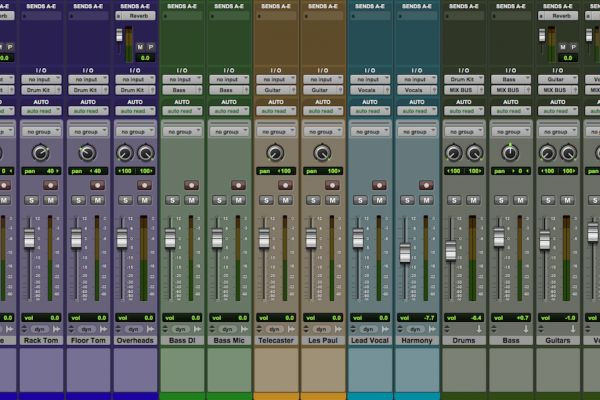

What Are Sends and Returns?
In the world of music production, sends and returns—also known as auxiliary or FX channels—are essential features that allow you to route a portion of a track's audio signal to an auxiliary channel (send). Here, effects can be applied, and the processed signal is then mixed back into the original track (return). This method offers a flexible and efficient way to enhance specific elements of your mix.
Why Use Sends and Returns?
Efficiency: Sends and returns streamline CPU usage by enabling you to apply a single instance of an effect to multiple tracks. This is particularly beneficial for resource-intensive effects such as reverbs and delays.
Consistency: Using sends to apply the same effect to multiple tracks ensures a consistent sound across your mix, creating a cohesive sonic environment.
Creativity: Sends open up a realm of creative possibilities. You can experiment with various effects and processing techniques without altering the original track’s integrity.
Control: Sends offer precise control over the affected signal's level, allowing you to balance the dry and wet signals perfectly.
Practical Tips for Using Sends and Returns
Setting Up Sends: In your DAW, create a send on the track you want to enhance. Choose the destination as an auxiliary channel (return) and adjust the send level to control the amount of signal being routed.
Organize Your Effects: Group similar effects on dedicated return channels. For instance, have separate returns for reverbs, delays, and modulation effects to enhance workflow and maintain organization.
Parallel Processing: Leverage sends for parallel processing. Route a portion of a track to a return channel, apply heavy processing (compression, distortion, etc.), and blend it back with the dry signal to add character.
Creating Space with Reverbs: Use sends to create a sense of space. Applying reverb on a return channel can add cohesive ambiance to multiple tracks, maintaining a unified spatial feel.
Adding Depth with Delays: Experiment with delays on return channels to add depth and dimension to vocals, guitars, or synths. Adjust the timing and feedback for creative rhythmic effects.
Applying Modulation Effects: Sends are excellent for applying modulation effects like chorus or flanger. Experiment with subtle modulation on vocals or instruments to achieve a richer, more animated sound.
Blend and Automate: Blend the processed signal with the dry signal using the return channel's fader. Automate send levels to create dynamic transitions and effects throughout your track.
Creating Custom Reverbs: Create custom reverbs by sending various instruments to a return channel with a reverb effect. Adjust the reverb settings to tailor the spatial characteristics to your preference.
Use Sends for Parallel Compression: Apply parallel compression to individual elements or the entire mix. Send the desired signal to a return channel with a compressed signal and adjust the blend for enhanced dynamics.
Experiment with Feedback Effects: Explore feedback effects by sending an element to a return channel with effects like a resonator, filter, or pitch shifter. Experimentation can lead to unique and innovative textures.
Mastering the use of sends and returns can significantly enhance your music production skills, providing you with the tools to create more dynamic, polished, and creative mixes. Dive into these techniques, and watch your tracks come to life.